The Blog for the Web and Computer Users


THIS BLOG

This blog is the online record of my observations and experiences about using the computer and about web surfing. Click on Older Posts at the bottom to view more pages. Click on the 'Added features' placed below the posts and get entertained and enlightened! You can get this blog quickly by adding it to Bookmarks or Favorites tabs. [Visit also my other blogs: Natural Scientific & Medical Wonders and Kindling Thoughts].
Showing posts with label Web. Show all posts

Tuesday, September 25, 2018

This site, Sitemeter, can't be reached!


        In 2008, when I entered blogging, I wished to know how many people are visiting my blogs. So, I selected Sitemeter as it showed many useful reports about the visitors. In the year 2013, I found in one of my blogs the Sitemeter widget was replaced by a black rectangle! As there were it's widgets in my other blogs, I left out the matter as such. 


             Later on, recently, I found the widgets' links disappeared in my other blogs too! I found its name only on them and there were no codes for it in them. I could not get the Sitemeter website itself in my computer. There was a display on the computer screen as: 'This site can't be reached.' On googling, I found that Sitemeter is not functioning now! I lost all the benefits of viewing about the visitors' details such as their visiting time, country of origin, the browsers used, from where they visited, which pages they visited and how many minutes they viewed, the last page they viewed and so on. 


You can read more about the lost Sitemeter here:

http://whatdoino-steve.blogspot.com/2015/06/sitemeter-out-of-control.html

http://www.thomaslegion.net/americancivilwar/whathappenedtositemeter.html

https://openparachute.wordpress.com/2015/08/10/time-to-give-up-on-sitemeter/


Saturday, December 23, 2017

Yet other virus attacks and finally a solution for them all!


              In the previous  posts of this blog, I had mentioned about worm and virus attacks in my computer. Later I got still more attacks with them. Out of them you see in the above picture the Trojan:Win32/Detplock virus, that is displayed by Windows Defender. In the picture placed down you see yet two other viruses! They are Trojan:Win32/Powemet.A!reg virus and Trojan:Win32/Bagsu!rfn virus.


              Each time I surfed the Internet, I got them displayed by the Windows Defender as quarantined by it and removed them manually each time when I shut down the computer. Later, I observed that new viruses are coming up from the surfed websites rather than from the infected computers of the commercial Computer centres. Then I found out the website that was issuing the viruses to my computer!


                You see here above the picture of the website I used to surf through. Each time I clicked on a news article in it to read in a separate window, I got the viruses in the Defender showing them as captured! I stopped clicking on the news articles from then and observed for the past one month. I never had an attack with any virus! So, be careful in clicking on news items too as in clicking on advertisements.

Read here about the other virus threats I encountered:

Win32/Gamarue.gen!A

Win32/Powemet.B!attk

Monday, March 20, 2017

Incorrect information from Wikipedia!


While checking the news on the demise of Mr.Chandrahasan, (the eldest bother of the actor, Mr.Kamalahasan), I found the above noted wrong information on Mr.Charuhasan, the younger brother of him, in Wikipedia website. The information given on 19 March 2017 was that Mr.Charuhasan passed away. On 20 March 2017, the next day (today), I find that mistake corrected as seen below.


So, don't depend on the Internet knowledge. The contents on the source may change at anytime! The persons posting information on the Internet must double check the information carefully before, during and after posting it and correct any mistake, if found, forthwith.

Sunday, March 19, 2017

Blocked website surfing!


The other day my usual web surfing was interrupted and there was a display showing that 'This site can't be reached'! When I clicked on the RELOAD, there was no response at all.


On clicking DETAILS, there came a display of list of options that didn't work too.


On clicking 'Checking the proxy, firewall and DNS configuration,' a window opened on the right side (Security Overview) and declared that 'This page is not secure'! Inferring that the website is being blocked for surfing by the ISP. 


 I installed UltraSurf, {that assured privacy, security and freedom) to circumvent internet censorship. After this, I could surf through that website easily without being blocked! 


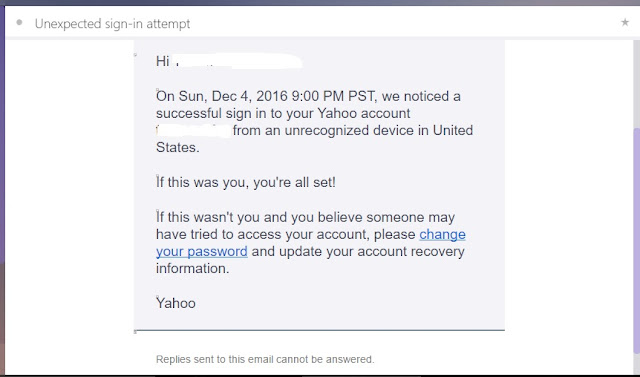
But, I received a mail that someone has tried to access my mail account from United States! This mail arrived after I accessed my mail account next to that easy surfing of the website! The Ultrasurf is based in US!

Saturday, December 24, 2016

Yahoo mail account security issue!

Recently I got on to the Yahoo web page and started to sign into my Yahoo email account.There was a display that there is an 'Account security issue'!


Worried I proceeded further to sign in. But the mail inbox was obscured with a display in front of it. It required me to read about the issue and secure my account.


On clicking on the OK button, I was lead to the 'Yahoo Security Notice' page. It said that there was security issue with the accounts of certain Yahoo user accounts, and then had given FAQs on the issue and the steps to be taken by the user to protect account; that was followed by the information on the data security issue given by the company.


Next on clicking the 'What happened?' FAQ, I read that data of more than one billion user accounts had been stolen!


I wanted to know also the company's statement on the issue, dated 22 September 2016. It intimated that some third party intruder had forged cookies and accessed users accounts without a password!


After reading all these I hurried to protect my account with new password as instructed by the Yahoo Help Page. Then I received the following display.


OK. Do you have a yahoo mail account? First check your secondary mail inbox for any mail from Yahoo relating to your Yahoo account security. And then proceed immediately to protect your Yahoo account.

Tuesday, November 29, 2016

Securing FaceBook account by phone number!


FaceBook is said to be not a safe place to either show your phone number or place your's or others' phone numbers in its posts. Recently, there was also options in WhatsApp (which is now with FaceBook) to opt for using phone number for FaceBook's advertisement purpose. In such a situation, a display in the FaceBook account was shown up that told an account holder to help him to secure his FaceBook account!
Could it be a securing option or anything else after availing this help, it is anybody's guess!

Tuesday, November 22, 2016

Logging in Gmail by a 'Hijacker'!

Read here how helpful and sensitive is the Google Accounts team! I logged in the Gmail account to find that I am not allowed for accessing it! I doubted my logging in procedure and tried logging in into it again and again twice; but failed to access my account! I thought that somebody might have hijacked my account, and hence became depressed. But here too Google offered a help for me in this. There was a message starting with 'Oops!' and a link offering the help. Through the link I was advised that I might have disabled 'Cookies' and to enable the Cookies in the Settings. I tried next this enabling of Cookies without any hope; but found it work surprisingly that I could access my account with my next logging in! I thanked God for it. What mistake could I have done? I thought about it and after a while I found it: I had cleared the Cookies by using the Clear Browsing Data after my previous logging in into my account! That played such a havoc in accessing my account!
Later on, when I checked my secondary mail inbox, I found an email from the Google Accounts team about logging in to my account by some 'hijacker,' with advice to reset the password immediately!


Friday, February 15, 2013

Create card sent as postcard!


Days of drawing pictures on cards and sending them as greeting cards are gone. Now a website offers you tools online for that. In it you can use Clip Art, Text and Pencil tools to create your card on a theme Background; then opt for sending it as a postcard or share it in social websites or save it to your computer!


Or you can also use ready-made cards provided. Don't try later but create a card now itself with this --> Greeting Card Maker by clicking CREATE NOW in it!


Sunday, October 14, 2012

Entrecard lost from the Web World


Then, I decided to get an Entrecard for my blogs after seeing it to increase the visitors' traffic to the blog of another Blogger. It was also said to be a social network 2.0. I got it and used it; found it to be useful. In the last week of September this year, 2012, I was stunned to see a triangle with an exclamation displayed inside it in the place of my Entrecard widget. The Entrecard had stopped its service without any prior intimation about it. I examined the widget html. It showed a word as '...recard'. In the word, 'entrecard' 'ent' was missing! Yes, Entrecard has quit the Web World.


Entrecard, a source for visiting many blogs, is now missing. Read here a report about this missing Entrecard that has been presented by one of its most popular blog-by-ranking --> Seek No More - Earn While Snoring!

Monday, August 6, 2012

Picture deletion via Picasa!


Recently, I opened my Picasa Web Albums account and found much space of it occupied by unwanted pictures. I began to delete them one by one to save the storage mbs. Suddenly it struck to me that those pictures are those I used in my blog posts; I opened my blog to see anything happened in it. Yes, I found black squares in the place of pictures: there was picture deletion in all the posts that had the pictures that I deleted in Picasa :( Luckily I had preserved some of those pictures in my computer that I used and saved my blog posts :).


Saturday, July 21, 2012

Size matters in HTwins!


Do you want to travel along a museum that displays all the objects from the size of the smallest to those of the largest in this Universe? I had such an experience with one website. In its homepage you shall have to click on the 'Start' button. You first see the objects of sizes from Giant Earhworm, Dodo, Rafflesia flower, Beach ball and Human; at the centre a small circle showing the next smaller sized objects including a flying Humming bird is seen.


Then you can move the scroll to the right to view the objects with increasing sizes - up to the 'Estimated size of Universe' (10 to the power of 27.0)! Or move it to the left to view the objects with decreasing sizes - down to 'Quantum Foam' or 'String' through 'Neutrino' (10 to the power of -35.0)! Al these are displayed with a background music. Try this exciting website here -> HTWINS.NET - The Scale of the Universe 2

Tuesday, July 3, 2012

Here read about PayPal HERE!


PayPal has released a tiny credit card reader for smart phones. It is the PayPal Here. With it and its applications, mobile payments can be done. It is triangular in shape with a fold down wing and plugs into phone. After signing in PayPal is done, it encrypts credit card data and transmits it into the phone for effecting online payments. It can track your past payments and issue invoices too. It is a versatile competitor for the other one, the 'Square'!

Saturday, March 10, 2012

RIP Adgitize


I was introduced to a website to get more visitors' traffic to my blogs. I signed with it as it also assured payment by PayPal whenever there is accumulation of points - for visitors' clicks on its ads and also for my each blog posting. Recently I was shocked to see its widget on my blogs announce its closure! It is the well popularized Adgitize. It follows the Verveearth, Google Buzz in the list of closure. It is now over. RIP Adgitize.
Read about it here also:
Thoughts on Adgitize closure

Sunday, August 14, 2011

Changing Google Docs!

I do not know whether it is a mere coincidence or not. When I started to open and have the old version of Google Docs for typing my new blog article, I find that my way of blogging through the Google Docs with its old version will not work any more. Only in my previous post I had informed you all about my way of blogging. Now the Google Docs has done away with its old version. Frustrated I have now moved to type in the Blogger Post editor. It is easy to type but it has taken about two hours to publish it to the blog now! It had then taken only twenty minutes to publish through old version of Google Docs. OK. Times are changing as do principles and policies. Let us adapt to these changes and blog our experiences with the web & computers.

Tuesday, May 24, 2011

R.I.P. MyBlogLog

I clicked on in Bookmarks of my browser to get MyBlogLog now. But I got Yahoo page only. I went through all my blogs and find that beautiful widgets of MyBlogLog are all gone. R.I.P. MyBlogLog.

Saturday, August 28, 2010

Free SMS to mobiles - with Way2sms!

Nowadays sending SMSs has also become an essential part of communication in the society. All banks, TV channels etc. offer their services through SMS! If this SMSing is provided free of cost and that too unlimited, all will be trying to get it, isn't it? This Web(computer) to mobile SMSing is offered by a website, called Way2sms. This website assures you speedy and easy sending of SMS (but it is available only for the mobile networks present in India). It permits only your mobile phone number to be used as User id in it. If you register at this website your password will be sent to your mobile by SMS! Do you want to register? Try it here by clicking on: Way2sms!


Friday, August 6, 2010

Check Accuweather for forecasts!


Whichever place you may go, you shall assess the weather conditions before getting out. But you may face unfavorable weather unexpectedly after getting out and traveling, or after reaching the destination. Here comes to you a helping hand in the form of weather forecasts from the Internet website, AccuWeather. In the home page of this website enter your location (city's name) and click on the Search tab. You shall be led to the forecasts about the current Temperature, Real-feel temperature, Wind flow, Humidity, Visibility etc. These can be referred not only for today but also for each hour, the whole week, the next week or the fifteen days! You can know about the weather conditions instantly by noting the icons displayed, when there is cloudiness, rains or thunderstorm! If you live in Canada, USA, UK or Ireland you can check the local weather more elaborately than anywhere else. Click on the country's name and in the shown web page you can see also the forecasts for Star-gazing, Phases of moon and about the Planets' position in the sky! If you visit this website you will stick to it and check it whenever you get out!

Friday, July 16, 2010

Be alert to use your email account!

Nowadays email ids and email accounts have become essential for every individual as the name and address are essential for receiving snail mails (postal system). But unlike the snail mail one has to use it continuously and cannot leave it dormant. If you keep it idle, you may lose your email account with the email id and its contents! See here a sample email letter from a user friendly email provider, Sifymail, that alerted me about an account that lay idle:


Thursday, June 10, 2010

Translate with Google Translate!

Though there is an international language, some nations in the world are self satisfied with their own language as sufficient for their communication needs. But in this age of globalization, international issues and problems like the pandemic diseases (such as Swine Flu) and other disputes have to be dealt with globally. All have to know and understand what is happening in other nations. Here comes an aid for that in the form of Google Translate. With this one foreign language can be converted into his/her own language and read to respond. Simply one can first select a language from the Select Language drop down list found on the Google Translate widget, that is present on the page of the website or blog. Within seconds the whole web page would have been now converted into the selected language! And then go and read the contents in the selected language. Even this blog post can be converted here and read!


Friday, June 4, 2010

Modern gadgets: iPhone, iPod, iPad ...!


The present fashion with the world is to listen or talk always with modern gadgets that are being released in the market one after the other. Yet others are not satisfied with this: they want also other facilities incorporated into the gadgets in addition. Result of this is the development of a separate market for each of such gadgets. Thus we miss to know about the features of these varied gadgets themselves before buying them.
Smart Phone: It is the regular mobile phone that has also the Personal Computer functions added. But unlike regular phones, it uses advanced applications like eBook Reader, Wi-Fi, etc.


iPhone: It is a Smart Phone as said above with the web browsing and Portable Media Player facilities. It provides touch screen as user interface. It is also compatible with third party applications like GPS, Games, etc.


iPod: In listening music iPods, the portable media players have created a craze among people, as the storage of music numbers are in thousands! A tiny gadget having such an unbelievable enormous storage capacity! Many types of iPods are offered like Classic (hand driven), Touch (touch screen), Nano (video) and Shuffle (compact). They have pushed out all those cassette and disc players out of market into the past.


iPad: It is a Tablet Personal Computer that has been made for web browsing, gaming, media playing, etc. It has been brought out as a device between a Smart Phone and a LapTop. It is of a size of a letter paper with half an inch thickness. It has a flash memory of 64 GBs. It can run applications in thousands. iTunes, iBook, and iWork are the few examples.

About Me

My photo
"I am interested in the wonders of this Universe."

Tweeting

Follow Tinazan on Twitter

Blog Archive

Labels

Google
 
Powered By Blogger
Bookmark and Share
Blogging Fusion Blog Directory

In appreciation, if you like:

Gle Alts

Subscribe via email

Enter your email address:

Delivered by FeedBurner

Web & Computer ads

Disclaimer

All data and information provided on this blog is for informational purpose only. http://www.webcomputerusers.blogspot.com makes no representations as to accuracy, completeness, validity of any information on this site and will not be liable for any errors, misinformation, omissions or any losses, injuries or damages arising from its display or use. All information is provided on as - is basis.