The Blog for the Web and Computer Users


THIS BLOG

This blog is the online record of my observations and experiences about using the computer and about web surfing. Click on Older Posts at the bottom to view more pages. Click on the 'Added features' placed below the posts and get entertained and enlightened! You can get this blog quickly by adding it to Bookmarks or Favorites tabs. [Visit also my other blogs: Natural Scientific & Medical Wonders and Kindling Thoughts].
Showing posts with label Computer. Show all posts

Tuesday, September 25, 2018

This site, Sitemeter, can't be reached!


        In 2008, when I entered blogging, I wished to know how many people are visiting my blogs. So, I selected Sitemeter as it showed many useful reports about the visitors. In the year 2013, I found in one of my blogs the Sitemeter widget was replaced by a black rectangle! As there were it's widgets in my other blogs, I left out the matter as such. 


             Later on, recently, I found the widgets' links disappeared in my other blogs too! I found its name only on them and there were no codes for it in them. I could not get the Sitemeter website itself in my computer. There was a display on the computer screen as: 'This site can't be reached.' On googling, I found that Sitemeter is not functioning now! I lost all the benefits of viewing about the visitors' details such as their visiting time, country of origin, the browsers used, from where they visited, which pages they visited and how many minutes they viewed, the last page they viewed and so on. 


You can read more about the lost Sitemeter here:

http://whatdoino-steve.blogspot.com/2015/06/sitemeter-out-of-control.html

http://www.thomaslegion.net/americancivilwar/whathappenedtositemeter.html

https://openparachute.wordpress.com/2015/08/10/time-to-give-up-on-sitemeter/


Wednesday, June 20, 2018

Yahoo Mail account losing and its recovery!

           Earlier in one of my posts here, I had alerted readers about the hijacking of Yahoo mails' particulars. Later, Yahoo Mail wanted to protect its account holders and made changes in its safety procedures. I had not read its alert mail about this change. Result: I lost one of my Yahoo Mail account. I was earlier careless while signing in the account and ignored it's demand to add phone number or change the alternate mail address to one that is active.
While I wanted to recover my account somehow, I learnt all these from 'Yahoo! Help': 

1. I cannot get back my account online if I have an old inactive alternate recovery email address for the account. (I was instructed to contact Yahoo Mail through personal mail/phone, indicating a laborious procedure ahead).


2. The security questions and answers don't work now to confirm my identity; I have to update my recovery email and mobile number to confirm my identity.


3. I can replace up to ten emails to get my mail account recovered and in order to prove my identity by following the account recovery methods mentioned here!


4. Recovery option is there on web browser from computer or mobile phone App.


So, be alert to change the lost or inactive recovery mail and phone number to an active and alive one to save your account from locked.

Saturday, December 23, 2017

Yet other virus attacks and finally a solution for them all!


              In the previous  posts of this blog, I had mentioned about worm and virus attacks in my computer. Later I got still more attacks with them. Out of them you see in the above picture the Trojan:Win32/Detplock virus, that is displayed by Windows Defender. In the picture placed down you see yet two other viruses! They are Trojan:Win32/Powemet.A!reg virus and Trojan:Win32/Bagsu!rfn virus.


              Each time I surfed the Internet, I got them displayed by the Windows Defender as quarantined by it and removed them manually each time when I shut down the computer. Later, I observed that new viruses are coming up from the surfed websites rather than from the infected computers of the commercial Computer centres. Then I found out the website that was issuing the viruses to my computer!


                You see here above the picture of the website I used to surf through. Each time I clicked on a news article in it to read in a separate window, I got the viruses in the Defender showing them as captured! I stopped clicking on the news articles from then and observed for the past one month. I never had an attack with any virus! So, be careful in clicking on news items too as in clicking on advertisements.

Read here about the other virus threats I encountered:

Win32/Gamarue.gen!A

Win32/Powemet.B!attk

Friday, December 1, 2017

Pendrive files hide! About seeking and recovering them!

    The other day I wanted to read the files contained in my pendrive. On inserting the pendrive in the computer, two unknown folders and an icon with my pendrive's name were displayed instead of my various folders and files! On clicking those folders, they showed no relevant files. But on clicking the short-cut icon, which showed to contain a total 2GB of its contents, only an announcement was displayed as follows:

                     rundll missing entry vfvbl1hN7nTDtZJX

     Content files were not displayed here also. I copied this announcement and searched with it in the Google search engine. From the results I learnt that the files and folders are hidden and can be recovered back by some simple procedure! I was relieved of my sadness and tension. A website in the search result offered solution for all who find such a problem. You can read about it here.
                                  
                   'Pendrive show empty even when data exists'

That procedure is here in simple terms:

1) Scan pendrive for virus first and remove it if found.
2) Note the pendrive's letter in the My Computer or This PC.
3) Go to Start > Run > type "cmd" in the box (without quotes - cmd)
4) In the Command Prompt type the following line:
               attrib -h -r -s /s /d G:\*.*
     where 'G' can be replaced by your pendrive's letter.
5) Then press Enter.
6) Now check if it works and the files are back in the pendrive.

What did I do then, after recovering the pendrive files?

I scanned the pendrive for virus again; copied all the files of it and saved them in a folder of the computer; next formated the pendrive and made it empty. Now copied the files that I have saved in the computer and pasted them all in the pendrive!

A 'ghost file' seen!

After recovering all the hidden files, I found a "ghost file' among them. You see here about it in these pictures!


Ghost File


Size of the ghost file


Properties of the ghost file

If you have ever found such a file in your experience share it here.

Saturday, August 26, 2017

Worm of computer, Win32/Gamarue.gen!A attack!


As I opened my computer, there was an alert message saying that there is a malware in the computer and the Windows Defender is taking action to remove it. When I checked the Windows Defender, it showed in its History tab that there are two malwares and both are quarantined. I hurriedly removed them both under Quarantined items and the All detected items and was happy about my action. But when I started the computer in the next session, the alert message came on again as the computer is affected with malware! I Googled and found the first one, Win32/Gamarue.gen!A to be a worm that replicates itself and infects all computers it gets access to. Yes, I got it through my USB that I used to get a print-out from a computer centre! Microsoft website simply advised me to remove it by its Windows Defender Antivirus software, that hadn't worked in my case. Then, I accessed a blog in Malware Tips.Com that came into rescue of my computer from this nuisance, the worm infection. I clicked the Open menu in the right corner of the Mozilla Firefox and clicked on the Open Help Menu. It led me to a list. In the list clicked on Troubleshooting Information. On a box that displayed, Refresh Firefox, I clicked. That's all. The browser was refreshed. Next time when I started the computer, this worm didn't return to infect my computer! But what about the other malware that was first detected by my Windows Defender? That is to be my next post's content - content of discussion only!

Tuesday, July 25, 2017

Why does my computer show different date and time?

    
My desktop computer behaved differently: it refused to boot normally; restarted often before its starting up. Then, in a day it refused to open up with the following display on its monitor before its opening up:


The firmware has detected that a CMOS battery failure occurred.
Press the Enter key to continue.

On Googling with the above sentence and the word, CMOS, I found out that there will be also an error in date and time display due to low voltage from CMOS battery. And that that CMOS battery has to be replaced with a new one to restore the computer to its normal functioning. I found the date and time malfunctioning as said! I adjusted it to the correct displaying. But the malfunctioning continued! The next day, the computer refused to start showing that same display on the screen. I rushed to the stores and bought this large-sized button cell, the so called CMOS battery and replaced the old one with it. And now hurray! The computer booted and started up. I adjusted the clock to the correct date and time. There was no malfunctioning of the clock too!
 

Sunday, March 19, 2017

Blocked website surfing!


The other day my usual web surfing was interrupted and there was a display showing that 'This site can't be reached'! When I clicked on the RELOAD, there was no response at all.


On clicking DETAILS, there came a display of list of options that didn't work too.


On clicking 'Checking the proxy, firewall and DNS configuration,' a window opened on the right side (Security Overview) and declared that 'This page is not secure'! Inferring that the website is being blocked for surfing by the ISP. 


 I installed UltraSurf, {that assured privacy, security and freedom) to circumvent internet censorship. After this, I could surf through that website easily without being blocked! 


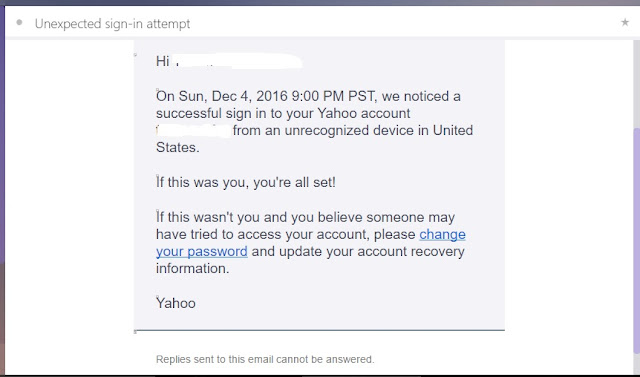
But, I received a mail that someone has tried to access my mail account from United States! This mail arrived after I accessed my mail account next to that easy surfing of the website! The Ultrasurf is based in US!

Wednesday, January 25, 2017

Cancelling 'Error Checking' to prevent data loss!


           While I started using an USB or an SD card inserted in my computer port, a box was displayed saying that there is a problem with it and to scan it; if I denied scanning to proceed on, there was another display in the screen to 'Repair this drive'! When I encountered this for the first time, I clicked on the 'Repair drive' fearing data loss. But actually I lost all the data after it from the SD card that I used! Next time, I met the same problem with an USB. I cancelled that display box titled as 'Error Checking' and saved the data loss from the USB. Do you have such an experience? Share it.

Tuesday, November 22, 2016

Logging in Gmail by a 'Hijacker'!

Read here how helpful and sensitive is the Google Accounts team! I logged in the Gmail account to find that I am not allowed for accessing it! I doubted my logging in procedure and tried logging in into it again and again twice; but failed to access my account! I thought that somebody might have hijacked my account, and hence became depressed. But here too Google offered a help for me in this. There was a message starting with 'Oops!' and a link offering the help. Through the link I was advised that I might have disabled 'Cookies' and to enable the Cookies in the Settings. I tried next this enabling of Cookies without any hope; but found it work surprisingly that I could access my account with my next logging in! I thanked God for it. What mistake could I have done? I thought about it and after a while I found it: I had cleared the Cookies by using the Clear Browsing Data after my previous logging in into my account! That played such a havoc in accessing my account!
Later on, when I checked my secondary mail inbox, I found an email from the Google Accounts team about logging in to my account by some 'hijacker,' with advice to reset the password immediately!


Tuesday, September 27, 2016

A recurring dialogue box!


I gave connection to my computer with my mobile phone through an USB. I clicked on the phone's contacts data. But after that a dialogue box came on the desktop screen. Even if I closed it by clicking on the Cancel or X of it, it recurred. Later so many of the same box appeared like stacked playing cards one after the other with my closing each one of it! I wondered whether it could be due to a virus playing this card! But when I restarted the computer all those dialogue boxes were gone! I heaved a sigh of relief. Do you know anything about it? Or had you a similar experience? Share it here for me and the blog readers.

Sunday, July 31, 2016

Performance as new from an aged computer!


Desktop computers start to get problems in three years of their purchase. My computer had problems either one after the other at a time, or had combined-in-one as problem that made me much frustrated when repairing it. But I found out now that it can do perform to its best as a new one by simply replacing a few of its low performing parts, plastic parts, and checking & tightening the contacts! Read here about what I did for it!
I found the computer to restart often. While checking the Bios, it gave the information that the processor temperature is gradually increasing to 100' C and above! And that there is no Hard disc at all in the CPU! So, I replaced first the processor cooling fan that has slowed down in its speed. Next, I  


replaced the UPS itself, as its plastic parts had turned brittle making electric sparks at the contact points. Then I found the wire bundles hanging loosely lower down in the space inside the CPU; they obstructed the free airflow from the side wise cooling fan on to the processor fan. So, I fastened that wire bundle with a twine to the hardware fitting frame. When I inspected the hard disc area, I noted the contact wires to be loosely fitting with it. I had purchased earlier a new contact wire and connected it with the hard disc, replacing the old one. It is an incompatibly of newer wiring products with that of the older version hard discs! I connected the plug head of the wire with a twine tightly fastening to the hardware fitting frame. Now, the plug fitted snugly within the socket of the hard disc. Hoping next nothing out of my efforts, I started the computer. I was surprised!


The computer worked by itself! No restarting problem! Extended hours of work - more than four hours and longer surpassing laptops! Bios too confirmed the lower cooled down temperature of processor and the presence of hard disc!

Monday, November 9, 2015

Deception in phone revealed on computer!


I found an interesting message in the Whatsapp App of my mobile phone. It informed that one can video-call for free by tapping on a 'Whatsapp' web-link given down in the message. But that link directed to a website. I closed that website page as I had been already warned of such websites. Then in a few minutes I received a call from a friend in Dubai who by this calling checked video-calling using that web-link! But there was no video display of my friend on my phone. I warned the disgusted friend about such websites, and to desist from using them. Then I entered the URL (web address) found in that Whatsapp message in my computer browser. Only a warning was displayed as 'Reported Web Forgery!' On the computer, that fake website was blocked! Whether it is a faking or a hacking or a spying or a mocking website or not, it has some motive behind it to deceive us. So, beware of such websites and their directing web-links in the Whatsapp messages of phones. Delete the messages containing them.

Thursday, January 8, 2015

Fusing Electronics with Electricity!


 My computer was restarting often, unusually. I went on and on checking all the computer parts for defects in the materials or the functionality. But I could not make out anything; all were well in shape and fitness. Later on, I heard some crackling noise coming from the back of the computer as soon as I started it. I went behind the computer and 'found' the site of the sound! Yes, it came from the back of UPS where I could see sparks! But it was not from the Mains - power supply connection. But it was from the fuse carrier


plug! On close observation I found the plastic head of the fuse carrier cracked - probably from jamming against the wall behind; the miniature fuse inside the carrier has become loose and the spring under it could not hold it tightly - thereby making an improper connection to the UPS! That's the matter. When I replaced that defective fuse carrier, the computer was happy & started to function well with a smile, cheering me. So, have in mind that computer parts alone should not be checked in the trouble-shooting exercise. As an electrician could have found out and corrected such problems, try to be an electrical expert too in DIY - to avoid your such nutty conditions made by Electronics!

Sunday, April 13, 2014

Making computer fit again!


For the past four months I found my computer in repaired condition quite often. I could not continue using it, as whenever I started to use it, it went off. The matter was that its hard disc drive had become old enough to be replaced with a new one. The problem was noted when the computer went to the status of showing up these messages like 'Start windows normally' etc. repeatedly - that too as soon as it booted or even before it booted! I tried all measures that I came to know - like removing any unused/defective DVD-RW, etc.; but all of them failed. Computer mechanic was called; he tried by removing the Operating System and installing a new one; as this too was a failure, he replaced the Hard Disc Drive (HDD) with a new one. But even that too failed frustrating the mechanic himself. Puzzled, he then carried the CPU to his worktable and tweaked it; after two or three attempts he was successful somehow and brought back the CPU with a triumphant smile on his face. Now I have my computer as it was four years back in a fit condition - to blog again!

Saturday, August 24, 2013

Computer restarting problem, Start normally!


It was an irritating affair for me for the past three months: my computer failed in the middle of surfing the Internet - not once; but went on so repeatedly: the computer screen displayed the next three options for proceeding further; the first one was 'Start windows normally.' Whenever I selected this 'Start windows normally' and entered, the session lasted only for a few minutes and went on again to display those three options for starting the computer! I learnt from this that whenever I hit the Enter key as soon as the options are displayed, the session lasted for more minutes than before; but this technique too failed in the next such few attempts. What has happened to the computer? I searched in the Internet for tips and applied my elementary knowledge; but it also failed. Computer mechanic too went on postponing, for long, his attending to this problem. My son found out the culprit causing this repeated restarting nuisance. Yes, it is only the wooly dust that had totally blocked the fins' spaces of Processor cooling-fan-motor-heatsink.


After clearing all these dust with a brush, the computer behaved itself normally - restored to its normalcy - without any repeated nuisance of displaying 'Start windows normally':) How could have such a large amount of dust gone inside for blocking? Probably, it was due to the daily sweeping of the room floor when the computer was on for working on it.What do you think about it? Any suggestions regarding this?

Friday, February 15, 2013

Create card sent as postcard!


Days of drawing pictures on cards and sending them as greeting cards are gone. Now a website offers you tools online for that. In it you can use Clip Art, Text and Pencil tools to create your card on a theme Background; then opt for sending it as a postcard or share it in social websites or save it to your computer!


Or you can also use ready-made cards provided. Don't try later but create a card now itself with this --> Greeting Card Maker by clicking CREATE NOW in it!


Sunday, August 14, 2011

Changing Google Docs!

I do not know whether it is a mere coincidence or not. When I started to open and have the old version of Google Docs for typing my new blog article, I find that my way of blogging through the Google Docs with its old version will not work any more. Only in my previous post I had informed you all about my way of blogging. Now the Google Docs has done away with its old version. Frustrated I have now moved to type in the Blogger Post editor. It is easy to type but it has taken about two hours to publish it to the blog now! It had then taken only twenty minutes to publish through old version of Google Docs. OK. Times are changing as do principles and policies. Let us adapt to these changes and blog our experiences with the web & computers.

Wednesday, November 10, 2010

Defragmenting speeds up computer

When a file is formed on a computer disk, it may not occupy on it in a contiguous order. Moreover files that are deleted produce in their place a gap on the disk between the existing adjacent files. These files are called the fragmented files. These files slow down the speed of processing by computer to read or write a file. So, they require Defragmentation. With this defragmentation process the contents of the disk are organized close together in contiguity. This makes faster the computer's processing of files apart from creating free space by compacting the files.
Defragment (in Windows XP OS):
Start --> All Programs --> Accessories --> System Tools --> Disk Defragmenter --> select Disk --> click Defragment tab.

Click and read more about Defragmentation here:
Defragmenting
How to Defragment files?


Saturday, November 6, 2010

Keying in data unaware to a spy!

Do you think that you are making private data safely in a computer? You may be wrong! Each of your key stroke on the keyboard may be monitored stealthily by using Keystroke logging (Keylogging). This monitoring may be based on a software or a hardware. The hardware may have been inserted earlier between the keyboard and computer stealthily! And also check for any such programmes (softwares) that have been included to your computer (Control Panel) and remove them.

Know here more about:
Keystroke logging


Friday, September 10, 2010

Replace Mouse with Trackpad!


Already touchpads are there on Laptops. But the convenience of using them near Desktop computers will be greater. The 'Mouse' will be driven out of its position by the touchpad that is called as Trackpad here. Using it with fingers to track shall be felt like flipping through pages in a book. This pointing device is connected to the computer through Bluetooth wireless technology. You can view here the world's first Multi-Touch Trackpad released by Apple Inc. --> Magic Trackpad!

About Me

My photo
"I am interested in the wonders of this Universe."

Tweeting

Follow Tinazan on Twitter

Blog Archive

Labels

Google
 
Powered By Blogger
Bookmark and Share
Blogging Fusion Blog Directory

In appreciation, if you like:

Gle Alts

Subscribe via email

Enter your email address:

Delivered by FeedBurner

Web & Computer ads

Disclaimer

All data and information provided on this blog is for informational purpose only. http://www.webcomputerusers.blogspot.com makes no representations as to accuracy, completeness, validity of any information on this site and will not be liable for any errors, misinformation, omissions or any losses, injuries or damages arising from its display or use. All information is provided on as - is basis.