The Blog for the Web and Computer Users


THIS BLOG

This blog is the online record of my observations and experiences about using the computer and about web surfing. Click on Older Posts at the bottom to view more pages. Click on the 'Added features' placed below the posts and get entertained and enlightened! You can get this blog quickly by adding it to Bookmarks or Favorites tabs. [Visit also my other blogs: Natural Scientific & Medical Wonders and Kindling Thoughts].

Saturday, December 14, 2019

Yahoo removes Yahoo groups' contents tonight!

I received an email from Yahoo that, it is going to convert all the Yahoo Groups into Restricted Groups and remove all the groups' contents by midnight today, 14th December 2019, at 11.59 p.m. PST. To avoid this removal of Yahoo group's contents, Yahoo group users are advised by it to send to it a download request before 11.59 p.m. tonight.


After receiving the download request, Yahoo shall send the contents through the group user's email when the downloading is complete.


Friday, August 30, 2019

Ants - the Computer raiders!


The other day, I ignored a line of ants going into the crevices of my Laptop. The ants carried their whitish baby larvae with them. I expected them to evacuate the inside premises of the laptop within a day, when the summer heat lessens.


But later on, I found that I could not enter into the websites, when I signed in them with password. Though I entered the password correcly, the web page inquired me, "Forgot Password?" ! Repeatedly, I tried to sign in, failed, alarmed, and got tired of it. Suddenly, I was alerted by the still moving in and out of the ant line inside the laptop! Ho! I found out the cause of my inability to enter into web pages. The ants have disturbed the functioning of the keypad!


I turned the laptop upside down and slapped it on its back to drive out the ants.With the ants some white powdery dust came out of the edges of the keys and fell on the screen! I had to repeat this many times until I got no such powder-shower down. Feeling now satisfied that all the obstructing powders are removed and the ants are driven out, I tried to sign in the websites. But the same problem persisted; I could not enter into the websites. The technician examined the laptop, found the whole keypad gnawed down. I had to pay for the replacement of the damaged keypad.

If I had stored the laptop safely in a remote place on that day, I could have spared my hardship and the money spent. So, don't ignore a line of ants near your laptop/ desktop computer. Safeguard them from ants too.

Friday, August 23, 2019

Linked URLs returning 404 errors!


I received an e-mail in my inbox from Google Search Console Team informing that 404 errors are in the increase for my other blog. Natural Scientific and Medical Wonders. I checked my blog posts that had been linked with URLs of external websites, and found that the information received is correct. 


As I reviewed more and more posts of the blog, I found that the URLs linked in the older posts were only returned wih 404 errors (not found errors). I am reviewing and correcting each post of the blog.
So, I advise Bloggers to link their posts with URLs of permanent and standard websites only to avoid such shortliving-URLs spoiling the uniqueness of the posts.

Tuesday, November 20, 2018

Technocrati is gone!


                 As usual, when I viewed my blogs in this April 2018, I found the gadget of Technocrati, the popular Blog directory, was missing! I had added my blogs in 2008, to this world's largest blog directory. And I was proud to have my blogs rated in this directory. When I tried to visit this directory, I found it listed for sale in Uniregistry Market! Yes, then, in May 2014 itself, Technocrati had gone :(  The owners of the directory had deleted all the listed contents, and had begun to focus on their advertising network. Read about this story here: Business2community.

Tuesday, September 25, 2018

This site, Sitemeter, can't be reached!


        In 2008, when I entered blogging, I wished to know how many people are visiting my blogs. So, I selected Sitemeter as it showed many useful reports about the visitors. In the year 2013, I found in one of my blogs the Sitemeter widget was replaced by a black rectangle! As there were it's widgets in my other blogs, I left out the matter as such. 


             Later on, recently, I found the widgets' links disappeared in my other blogs too! I found its name only on them and there were no codes for it in them. I could not get the Sitemeter website itself in my computer. There was a display on the computer screen as: 'This site can't be reached.' On googling, I found that Sitemeter is not functioning now! I lost all the benefits of viewing about the visitors' details such as their visiting time, country of origin, the browsers used, from where they visited, which pages they visited and how many minutes they viewed, the last page they viewed and so on. 


You can read more about the lost Sitemeter here:

http://whatdoino-steve.blogspot.com/2015/06/sitemeter-out-of-control.html

http://www.thomaslegion.net/americancivilwar/whathappenedtositemeter.html

https://openparachute.wordpress.com/2015/08/10/time-to-give-up-on-sitemeter/


Wednesday, June 20, 2018

Yahoo Mail account losing and its recovery!

           Earlier in one of my posts here, I had alerted readers about the hijacking of Yahoo mails' particulars. Later, Yahoo Mail wanted to protect its account holders and made changes in its safety procedures. I had not read its alert mail about this change. Result: I lost one of my Yahoo Mail account. I was earlier careless while signing in the account and ignored it's demand to add phone number or change the alternate mail address to one that is active.
While I wanted to recover my account somehow, I learnt all these from 'Yahoo! Help': 

1. I cannot get back my account online if I have an old inactive alternate recovery email address for the account. (I was instructed to contact Yahoo Mail through personal mail/phone, indicating a laborious procedure ahead).


2. The security questions and answers don't work now to confirm my identity; I have to update my recovery email and mobile number to confirm my identity.


3. I can replace up to ten emails to get my mail account recovered and in order to prove my identity by following the account recovery methods mentioned here!


4. Recovery option is there on web browser from computer or mobile phone App.


So, be alert to change the lost or inactive recovery mail and phone number to an active and alive one to save your account from locked.

Saturday, December 23, 2017

Yet other virus attacks and finally a solution for them all!


              In the previous  posts of this blog, I had mentioned about worm and virus attacks in my computer. Later I got still more attacks with them. Out of them you see in the above picture the Trojan:Win32/Detplock virus, that is displayed by Windows Defender. In the picture placed down you see yet two other viruses! They are Trojan:Win32/Powemet.A!reg virus and Trojan:Win32/Bagsu!rfn virus.


              Each time I surfed the Internet, I got them displayed by the Windows Defender as quarantined by it and removed them manually each time when I shut down the computer. Later, I observed that new viruses are coming up from the surfed websites rather than from the infected computers of the commercial Computer centres. Then I found out the website that was issuing the viruses to my computer!


                You see here above the picture of the website I used to surf through. Each time I clicked on a news article in it to read in a separate window, I got the viruses in the Defender showing them as captured! I stopped clicking on the news articles from then and observed for the past one month. I never had an attack with any virus! So, be careful in clicking on news items too as in clicking on advertisements.

Read here about the other virus threats I encountered:

Win32/Gamarue.gen!A

Win32/Powemet.B!attk

Friday, December 1, 2017

Pendrive files hide! About seeking and recovering them!

    The other day I wanted to read the files contained in my pendrive. On inserting the pendrive in the computer, two unknown folders and an icon with my pendrive's name were displayed instead of my various folders and files! On clicking those folders, they showed no relevant files. But on clicking the short-cut icon, which showed to contain a total 2GB of its contents, only an announcement was displayed as follows:

                     rundll missing entry vfvbl1hN7nTDtZJX

     Content files were not displayed here also. I copied this announcement and searched with it in the Google search engine. From the results I learnt that the files and folders are hidden and can be recovered back by some simple procedure! I was relieved of my sadness and tension. A website in the search result offered solution for all who find such a problem. You can read about it here.
                                  
                   'Pendrive show empty even when data exists'

That procedure is here in simple terms:

1) Scan pendrive for virus first and remove it if found.
2) Note the pendrive's letter in the My Computer or This PC.
3) Go to Start > Run > type "cmd" in the box (without quotes - cmd)
4) In the Command Prompt type the following line:
               attrib -h -r -s /s /d G:\*.*
     where 'G' can be replaced by your pendrive's letter.
5) Then press Enter.
6) Now check if it works and the files are back in the pendrive.

What did I do then, after recovering the pendrive files?

I scanned the pendrive for virus again; copied all the files of it and saved them in a folder of the computer; next formated the pendrive and made it empty. Now copied the files that I have saved in the computer and pasted them all in the pendrive!

A 'ghost file' seen!

After recovering all the hidden files, I found a "ghost file' among them. You see here about it in these pictures!


Ghost File


Size of the ghost file


Properties of the ghost file

If you have ever found such a file in your experience share it here.

Thursday, October 5, 2017

The other worm attack, Win32/Powemet.B!attk attack!


In my previous post, I had mentioned that I got an alert message from Windows Defender about worms attack in my computer. I described about the removal of the first worm, Win32/Gamarue.gen!A. Now, you can get the details of the second one, Win32/Powemet.B!attk. This worm infection has been declared as of  severe nature. It infects computers through emails, USB drives, videos listening and clicking on web links in malicious websites. The Microsoft website says only that its Windows Defender detects and does not remove it! It advises to do full scan with Windows Defender or Microsoft Security Essentials. It hasn't given any suggestion for the removal of the malware, that can steal personal particulars from the computers. I wait for a solution from the Microsoft website. But so far there is no update on it. Each time I open the computer, I remove the worm from the Windows Defender box that quarantines it each time! If you have a solution, share it here.

Saturday, August 26, 2017

Worm of computer, Win32/Gamarue.gen!A attack!


As I opened my computer, there was an alert message saying that there is a malware in the computer and the Windows Defender is taking action to remove it. When I checked the Windows Defender, it showed in its History tab that there are two malwares and both are quarantined. I hurriedly removed them both under Quarantined items and the All detected items and was happy about my action. But when I started the computer in the next session, the alert message came on again as the computer is affected with malware! I Googled and found the first one, Win32/Gamarue.gen!A to be a worm that replicates itself and infects all computers it gets access to. Yes, I got it through my USB that I used to get a print-out from a computer centre! Microsoft website simply advised me to remove it by its Windows Defender Antivirus software, that hadn't worked in my case. Then, I accessed a blog in Malware Tips.Com that came into rescue of my computer from this nuisance, the worm infection. I clicked the Open menu in the right corner of the Mozilla Firefox and clicked on the Open Help Menu. It led me to a list. In the list clicked on Troubleshooting Information. On a box that displayed, Refresh Firefox, I clicked. That's all. The browser was refreshed. Next time when I started the computer, this worm didn't return to infect my computer! But what about the other malware that was first detected by my Windows Defender? That is to be my next post's content - content of discussion only!

Tuesday, July 25, 2017

Why does my computer show different date and time?

    
My desktop computer behaved differently: it refused to boot normally; restarted often before its starting up. Then, in a day it refused to open up with the following display on its monitor before its opening up:


The firmware has detected that a CMOS battery failure occurred.
Press the Enter key to continue.

On Googling with the above sentence and the word, CMOS, I found out that there will be also an error in date and time display due to low voltage from CMOS battery. And that that CMOS battery has to be replaced with a new one to restore the computer to its normal functioning. I found the date and time malfunctioning as said! I adjusted it to the correct displaying. But the malfunctioning continued! The next day, the computer refused to start showing that same display on the screen. I rushed to the stores and bought this large-sized button cell, the so called CMOS battery and replaced the old one with it. And now hurray! The computer booted and started up. I adjusted the clock to the correct date and time. There was no malfunctioning of the clock too!
 

Sunday, March 26, 2017

Addiction to Reliance Jio's free offer!


Reliance Jio, the Indian broadband company launched its free 4G Data and Voice services over VoLTE on 4th September 2016 and extended it up to 31st March 2017. Now almost all the people of India know about the name, 'Jio'! Many have bought the SIM card for free and became addicted to its services. 


When this Internet service is availed with Jio, my live visitor traffic viewer, Feedjit, showed my visiting  to this blog as from Jakarta, Jakarta Raya! I wonder whether the free Jio users are being spied from an another country other than India! 


Now the free offer date is going to end. What will the free Jio users do? Shall they leave the Jio and remain Internet-free or will they become addicted to Jio services in April 1st 2017? To know how many are addicted to its free services, Jio has now announced its 'Jio Prime Membership.' With this, the free service-addicted persons have (to become addicted again) to become a member by spending a token money of Rs.99!


After becoming an (addicted) member, they shall have to shell out Rs.19 (for 1 day of further addiction) through Rs.303 (28 days addiction, then extended for each of 28 days as per one's addicted state) to be in this 'free' inebriated state of remaining in the free Jio Internet service! But this is only up to 31 March 2018! To remain permanently addicted in Jio service for the next whole year (360 days), one shall have to shell out Rs.9999 and continue in this unlimited fun from Jio!
 

Monday, March 20, 2017

Incorrect information from Wikipedia!


While checking the news on the demise of Mr.Chandrahasan, (the eldest bother of the actor, Mr.Kamalahasan), I found the above noted wrong information on Mr.Charuhasan, the younger brother of him, in Wikipedia website. The information given on 19 March 2017 was that Mr.Charuhasan passed away. On 20 March 2017, the next day (today), I find that mistake corrected as seen below.


So, don't depend on the Internet knowledge. The contents on the source may change at anytime! The persons posting information on the Internet must double check the information carefully before, during and after posting it and correct any mistake, if found, forthwith.

Sunday, March 19, 2017

Blocked website surfing!


The other day my usual web surfing was interrupted and there was a display showing that 'This site can't be reached'! When I clicked on the RELOAD, there was no response at all.


On clicking DETAILS, there came a display of list of options that didn't work too.


On clicking 'Checking the proxy, firewall and DNS configuration,' a window opened on the right side (Security Overview) and declared that 'This page is not secure'! Inferring that the website is being blocked for surfing by the ISP. 


 I installed UltraSurf, {that assured privacy, security and freedom) to circumvent internet censorship. After this, I could surf through that website easily without being blocked! 


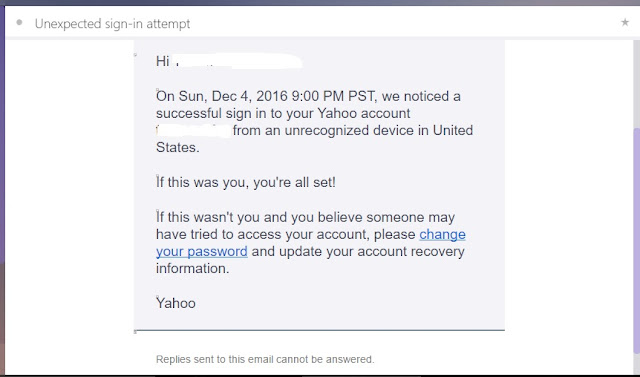
But, I received a mail that someone has tried to access my mail account from United States! This mail arrived after I accessed my mail account next to that easy surfing of the website! The Ultrasurf is based in US!

Wednesday, January 25, 2017

Cancelling 'Error Checking' to prevent data loss!


           While I started using an USB or an SD card inserted in my computer port, a box was displayed saying that there is a problem with it and to scan it; if I denied scanning to proceed on, there was another display in the screen to 'Repair this drive'! When I encountered this for the first time, I clicked on the 'Repair drive' fearing data loss. But actually I lost all the data after it from the SD card that I used! Next time, I met the same problem with an USB. I cancelled that display box titled as 'Error Checking' and saved the data loss from the USB. Do you have such an experience? Share it.

Saturday, December 31, 2016

Face Book's boosting activities!

I came across the following activities of the Face book in my account! You could view and read about them here.


To promote my Face Book page it demands money so that the page can reach more people!


On reaching thirty 'Likes' of my Face Book page, Face Book offers to view the statistics of the people who like the page!


To protect my account Face Book wants me to add my phone number and also quotes that my friends have added a phone number to their accounts!


Recently, Face Book offered me an easy way to enter into my account without using password!


Face Book advises me to click on my picture to log in next time!

Saturday, December 24, 2016

Yahoo mail account security issue!

Recently I got on to the Yahoo web page and started to sign into my Yahoo email account.There was a display that there is an 'Account security issue'!


Worried I proceeded further to sign in. But the mail inbox was obscured with a display in front of it. It required me to read about the issue and secure my account.


On clicking on the OK button, I was lead to the 'Yahoo Security Notice' page. It said that there was security issue with the accounts of certain Yahoo user accounts, and then had given FAQs on the issue and the steps to be taken by the user to protect account; that was followed by the information on the data security issue given by the company.


Next on clicking the 'What happened?' FAQ, I read that data of more than one billion user accounts had been stolen!


I wanted to know also the company's statement on the issue, dated 22 September 2016. It intimated that some third party intruder had forged cookies and accessed users accounts without a password!


After reading all these I hurried to protect my account with new password as instructed by the Yahoo Help Page. Then I received the following display.


OK. Do you have a yahoo mail account? First check your secondary mail inbox for any mail from Yahoo relating to your Yahoo account security. And then proceed immediately to protect your Yahoo account.

Friday, December 9, 2016

Donation support for Wikipedia!


Now, if  any Wikipedia page is opened, a display also appears along with the web page. It asks its readers donation support for its sustaining through the Internet.


For this non-profit Wikipedia that is on the list of top ten most visited websites, anybody around the world shall render help on reading this!

About Me

My photo
"I am interested in the wonders of this Universe."

Tweeting

Follow Tinazan on Twitter

Blog Archive

Labels

Google
 
Powered By Blogger
Bookmark and Share
Blogging Fusion Blog Directory

In appreciation, if you like:

Gle Alts

Subscribe via email

Enter your email address:

Delivered by FeedBurner

Web & Computer ads

Disclaimer

All data and information provided on this blog is for informational purpose only. http://www.webcomputerusers.blogspot.com makes no representations as to accuracy, completeness, validity of any information on this site and will not be liable for any errors, misinformation, omissions or any losses, injuries or damages arising from its display or use. All information is provided on as - is basis.